
Gantt Chart Library
- GanttChartView
- ResourceLoadChartView
GanttChartView component displays and manages tasks and dependencies using a hierarchical data grid and an attached interactive Gantt Chart accepting drag and drop operations for scheduling task bars and creating dependency lines. Supports custom appearance settings for standard, summary, and milestone tasks for the entire chart or for individual items, as needed.
Demo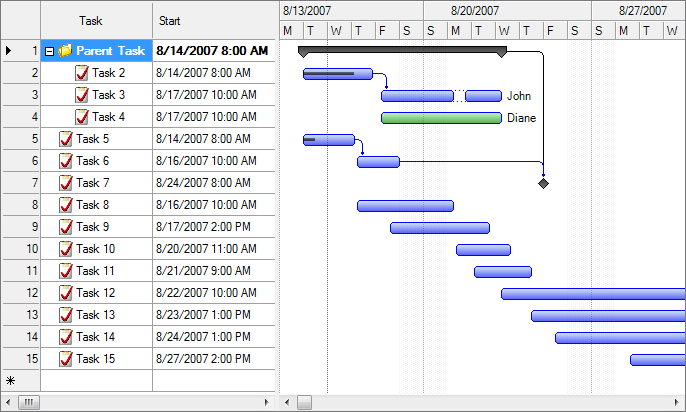

Items collection
To load and present data, initialize the DataSource and DataMember properties of the component, referring items representing timeline tasks identified by these main properties: IndentLevel, Content, Start, Work, CompletedWork, Interruptions, Resources, and Predecessors.
You may use either a custom type or a data table to create data item objects. If item property names are different, they should be identified using Member properties of the component. IndentLevelMember, StartMember, WorkMember, CompletedWorkMember, InterruptionsMember, ResourcesMember, PredecessorsMember, etc. The component also supports an unbound mode that directly allows you to create data grid rows instead. In this case Member properties of the component should point to the names of the data grid column objects.
Summary items are determined by checking Indentation levels of subsequent items, and can be expanded or collapsed. Standard items are presented as rectangular bars, and milestones as special diamond shapes in the view. Completion rate of a standard item is determined by evaluating CompletedWork value, representing the effort that is currently completed for the task. Resources value may be a string that specifies the resource assignments of the item with optional allocation units in classic format: Resource 1, Resource 2 [50%].
PredecessorsString may be a string that specifies the dependencies of the item with optional dependency type (abbreviated) and lag (in hours) in classic format: 1, 2SS+3.
Custom columns may be added to the tasks grid the same way as within a DataGridView control.
Drag and drop
End users may use drag and drop operations to reschedule bars, update start, finish and completion values independently, and create dependencies between items directly from the Gantt Chart area, besides editing values in an attached data grid.
Persistence independence
The component is persistence independent, so you can bind it to data collections from virtually any data source, including but not limited to SQL Server® databases and XML files. You may also customize the column collection of the grid by adding or redesigning data bound columns.
DemoPrinting and image exporting
The component offers a Print method that may be called to initiate a direct print operation for their content. Moreover, you can export scalable images of the component content by calling DrawTasksTreeGrid and DrawGanttChart methods on the fly, specifying a Graphics object to paint to.
Timeline and calendars
You may configure timeline position, visible and working days and hours, scales, update interval (for drag and drop operations), and zoom level (width of an hour) in the view.


Project management features
Besides data visualization features, the components offer some built-in project management functions such as GetFinish, GetProjectFinish, etc., baseline visualization, and algorithms like auto scheduling, critical path enumeration, and resource leveling.
Appearance
You may fully customize item appearance, either for the entire chart or for individual entries in the view, using specific properties. Critical tasks and remaining time intervals may also be highlighted with ease.
